A Modern Guide to Your Genesys Log In for AI-Powered Insurance and Finance
A Modern Guide to Your Genesys Log In for AI-Powered Insurance and Finance
Master your Genesys log in to power AI-driven insurance and banking operations. Learn to configure SSO, enhance security, and integrate AI for customer care.
The Genesys log in is the front door to your entire customer experience universe. It’s where your agents, administrators, and even your AI systems get to work, managing everything from routine customer questions to complex, automated workflows in banking and insurance.
Your Gateway to AI-Powered Customer Experiences
For any leader in financial services, that Genesys log in screen is much more than a simple password field. It’s the command center for your entire AI-driven customer interaction strategy. A smooth and secure login is the absolute first step in empowering your teams and intelligent systems to handle high-stakes tasks, whether that's processing an initial insurance claim or onboarding a new banking client. For modern AI insurance companies, getting this foundation right is non-negotiable for achieving real efficiency and accuracy.
This guide will walk you through the modern Genesys login experience. We’ll focus on how features like Single Sign-On (SSO) and advanced security logging are built to support the demanding, highly regulated worlds of banking and insurance. When access is simple and secure, you see real business results: less friction for your agents, a stronger security posture, and a compliant framework for integrating powerful AI customer care.
Connecting Secure Access to AI Automation
A rock-solid login process is the bedrock of great AI customer care. Once an agent securely signs into Genesys, they have the keys to a suite of tools that can kick off powerful automated workflows.
Imagine an insurance agent taking a first notice of loss call. From their Genesys desktop, they can launch an AI agent that instantly captures claim details, cross-references policy information, and even schedules an adjuster—all without leaving the platform. This kind of integration means every step is secure and auditable from the very moment of access. For a deeper dive, check out our detailed guide on AI-powered customer care.
The integrity of automated processes, like claims AI reviews, depends entirely on the security of the initial user authentication. A compromised login could expose sensitive customer data and disrupt critical operations, making secure access a top priority for compliance.
Meeting Compliance Demands in Finance
Genesys Cloud is trusted by over 7,500 organizations around the world, and a huge number of them operate in tightly regulated industries. Understanding the need for strict oversight, Genesys recently enhanced its security logging to capture detailed SAML authentications. This gives you complete visibility into every successful and failed login attempt.
This feature is a game-changer for compliance teams. You can now maintain a crystal-clear audit trail for every single user interaction, ensuring your access protocols are always up to industry standards. If you want to get into the weeds, you can read the technical details of these security logging updates from Genesys. This level of detail ensures that every action—whether from a person or an AI—is traceable and accountable.
Here’s a quick breakdown of the primary login methods and where they fit best within a financial services context.
Genesys Log In Methods for Financial Services
This table summarizes the primary login methods for Genesys, highlighting their suitability for different operational needs in regulated industries like banking and insurance.
Login Method | Primary Use Case | Security Level | Best For |
|---|---|---|---|
Direct Genesys Login | Basic access for small teams or initial setup. | Standard | Environments where simplicity is key and advanced identity management isn't yet required. |
Single Sign-On (SSO) | Centralized user authentication via a corporate identity provider (e.g., Okta, Azure AD). | High | Organizations looking to streamline user access, improve security, and simplify password management. |
Multi-Factor Auth (MFA) | Adding a second verification step to any login method (e.g., push notification, code). | Very High | All regulated environments; essential for protecting sensitive customer data and meeting compliance mandates. |
API/SDK Authentication | System-to-system access for custom integrations and AI bots. | High (Configurable) | Securely connecting third-party platforms like Nolana or internal AI systems to the Genesys ecosystem. |
Choosing the right login strategy is the first step toward building a secure and efficient operation. For most financial institutions, a combination of SSO and MFA is the gold standard, providing both user convenience and the robust security that regulators demand.
Configuring Single Sign-On for Secure and Efficient Access
In industries like banking and insurance, Single Sign-On (SSO) is far more than a convenience—it's a critical layer of security. When you set up SSO for your Genesys Cloud environment, you're building a controlled gateway to sensitive customer data. This has a direct impact on the integrity of your AI customer care and any automated financial workflows you're running. It hands IT and compliance a single, unified point of control over who gets in and who doesn't.
A proper SSO setup means your agents aren't fumbling with multiple passwords. This is a huge win. It cuts down on wasted time and, more importantly, slashes the risk of security slip-ups. In a high-volume contact center, every second saved matters. For AI insurance companies, a smooth SSO process is the first link in a secure chain that runs from an agent's initial genesys log in all the way to a final claims AI reviews.
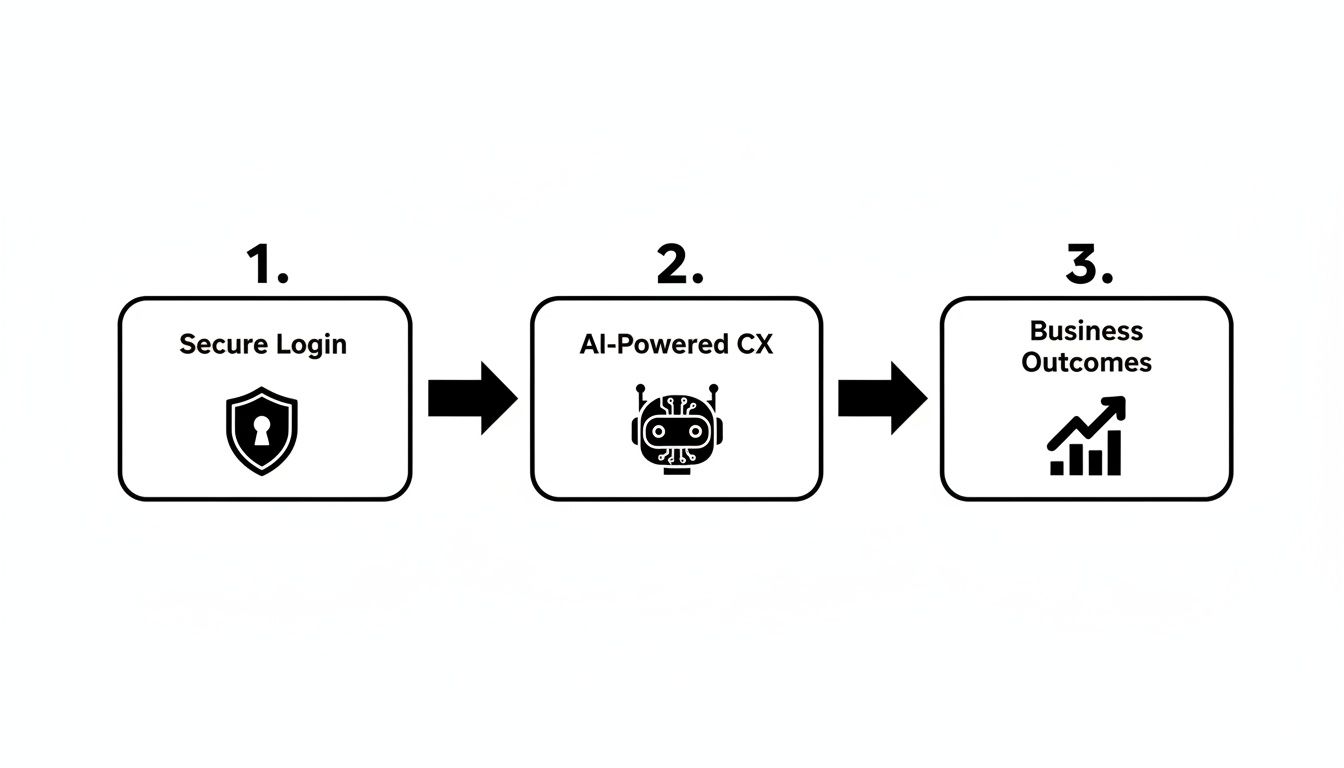
The point is, a secure and easy login isn't just an isolated IT chore. It's the starting gun for deploying powerful AI that drives real business growth.
Mastering SAML for Regulated Environments
When you're dealing with financial services, Security Assertion Markup Language (SAML) is the undisputed standard for SSO. It’s how your company’s identity provider (IdP)—whether that's Okta, Azure AD, or Ping Identity—can securely vouch for a user and pass them into Genesys Cloud. This process means Genesys itself never has to store user passwords, which is a massive boost to your security posture.
In the past, manually configuring a SAML integration was a pain. You'd be copying and pasting long certificate strings and endpoint URLs, and one tiny typo could lock everyone out, causing frustrating downtime.
A recent Genesys Cloud update introduced SSO management via SAML metadata file uploads, which is a game-changer for admins. This feature gets rid of the manual copy-paste routine, cutting configuration errors by up to 70% and saving a ton of time during setup. You can read up on this great little feature in the official Genesys release notes.
Practical Configuration Scenarios
SSO isn't a one-size-fits-all solution, especially in the financial world where things get complicated. Here are a few real-world scenarios I've run into and how to best navigate them:
Global Teams with Different IdPs: It's common for large companies to have separate identity providers for different regions. No problem. You can configure multiple SSO integrations in Genesys Cloud and assign specific IdPs to different divisions or locations. This ensures every team authenticates through their correct, designated system.
Staged Rollout for Minimal Disruption: Don't try to switch everyone over to SSO at once—that’s a recipe for chaos. Start with a small pilot group of trusted users to test everything from top to bottom. Once you're confident it's working perfectly, you can gradually roll it out to the rest of the company, keeping contact center operations running smoothly.
Certificate Rotation and Management: Remember, SAML certificates expire. If one does, it can lock all your users out of the system instantly. You have to be proactive here. Work with your IdP admin to schedule certificate rotations and set calendar reminders well in advance to coordinate the update in both your IdP and Genesys Cloud.
Getting these practical details right is how you build a resilient and secure access framework. With that solid foundation in place, you can confidently deploy the advanced AI tools that are changing the game in insurance claims and customer care.
Bolstering Security with MFA and Advanced Admin Controls
In the financial world, a simple password for your Genesys log in just doesn't cut it anymore. Fortifying your contact center environment really starts with Multi-Factor Authentication (MFA), which is your first and best defense against unauthorized access. Think of it as adding a deadbolt to your front door; even if someone gets a copy of your key (the password), they still can't get in.
For risk and compliance teams, enforcing MFA isn't just a good idea—it's a non-negotiable for meeting tough industry standards. This extra security layer is absolutely foundational before you can even think about deploying automated systems that touch sensitive customer data. It ensures every single user, from a frontline agent to a system administrator, is who they say they are before they can access the platform and kick off any AI customer care workflows.
Defining Granular Access with RBAC
Beyond that initial login, true security is all about granularity. This is where Role-Based Access Control (RBAC) in Genesys Cloud becomes so powerful. It lets you define exactly who can do what within the system, adhering to the principle of least privilege. In banking and insurance, this isn't optional; it's essential for keeping data access on a strict need-to-know basis.
You can move away from giving every agent the same broad set of permissions. Instead, create highly specific roles. For example, a claims intake specialist might only have the ability to start a new claim, while their manager has the unique authority to approve the final payout. This clear separation of duties dramatically minimizes risk and makes audits a breeze. It’s especially critical for AI insurance companies where automated systems and human agents work together on high-stakes decisions.
A secure Genesys instance is the launchpad for compliant AI automation. When an AI agent assists with an insurance claim or a banking transaction, the entire workflow must be auditable and protected. Strong RBAC and MFA policies ensure that both human and AI actions are authorized and tracked.
Getting these controls right isn't just a technical exercise; it's a business imperative that directly supports your regulatory obligations. If you're digging into the specifics of these frameworks, it's worth understanding what's needed for SOC 2 compliance and how those requirements map to your security posture.
Managing Session Timeouts and API Credentials
Your security diligence can't stop once a user is logged in. Managing active sessions and API access is just as crucial for maintaining a truly secure environment day in and day out.
Session Timeouts: A simple but effective tactic is to configure automatic session timeouts. This logs users out after a set period of inactivity, which prevents anyone from accessing an unattended workstation—a surprisingly common vulnerability in a busy contact center.
API Client Management: When you start connecting AI agents or other external tools, always use dedicated API clients with the narrowest possible permissions. Get into the habit of rotating these credentials regularly to limit the window of opportunity should a key ever be compromised.
These administrative controls act as the guardrails for your entire operation. From the moment someone logs in, they ensure every single interaction is secure, whether it's an agent taking a call or an AI running a claims AI review. This is how you build the trusted foundation needed to automate complex financial workflows with confidence.
Dealing With Common Genesys Log In Problems
Even in a well-oiled system, login issues are bound to happen, and they can bring your contact center to a standstill. A single failed Genesys log in isn't just an inconvenience; it can stall customer service, tank agent productivity, and throw a wrench in the automated workflows that AI insurance companies depend on. Getting things back online quickly is paramount.
This guide cuts through the generic advice to give you concrete, actionable steps tailored for IT administrators in financial services. We'll walk through the most common culprits—from tricky SSO configurations to permission denials—that can sideline your AI customer care and keep agents from helping customers.
Untangling SSO and Certificate Errors
Single Sign-On is fantastic for security and convenience, but it also adds a few more moving parts to your login process. When an agent can't get in, SSO is usually the first place I recommend looking. The issue often isn't even with Genesys itself, but with your Identity Provider (IdP).
One of the most common Gremlins in the system is an expired SAML certificate. These things have a built-in expiration date, and if you forget to rotate it, authentication will fail across the board. Another frequent trip-up is a mismatch in user attributes—if the data your IdP sends doesn't line up perfectly with what Genesys is expecting, access will be denied even if the password is correct.
When you're staring down an SSO failure, the Audit Viewer API is your best friend. It lets you dig into the logs of failed SAML attempts and gives you detailed error messages that will point you straight to the source, whether it's a bad certificate or a simple attribute mismatch.
Solving Permission-Based Access Denials
What about when an agent authenticates successfully but still can’t get to the tools they need? This almost always points to a permissions problem linked to their assigned role. In a regulated industry, we all live by the principle of least privilege, which is essential for security but can sometimes become a little too restrictive by accident.
If an agent reports this kind of roadblock, the first step is to dive into their role and permissions.
Check Their Role: Is the user assigned to the right role in Genesys Cloud? It’s surprisingly common for someone to be placed in the wrong group during onboarding.
Audit the Permissions: Take a close look at the permissions granted to that specific role. Did a recent security update accidentally revoke access they need for a critical task, like kicking off claims AI reviews?
Document Everything: Any access issue is a potential security event and needs to be treated as such. Always document these incidents thoroughly. Using a standardized security incident report form template is a great way to ensure you have a clean, auditable trail for any compliance checks down the road.
By systematically working through these common failure points, you can get your agents back online fast and keep operational disruptions to a minimum.
Integrating Genesys with AI for Automated Operations
The real power of your Genesys platform is unlocked when you start treating it as more than just a contact center tool. Think of it as the command center for a much larger ecosystem of AI and enterprise systems. A secure Genesys log in is the gateway, creating a trusted environment where AI agents can be deployed to handle high-stakes, repetitive workflows. This is exactly where platforms like Genesys and Nolana come together to create meaningful operational change, especially in finance and insurance.
Once a user is securely authenticated, the system can trigger sophisticated AI agents to manage entire processes from start to finish. We're not just talking about simple chatbots here. This is about full-scale automation, a game-changer for AI insurance companies aiming to speed up their core operations. The focus shifts from simply logging calls to actually driving complete business outcomes.
A Real-World Insurance Claims Scenario
Let's break down what this looks like in practice. Imagine an insurance customer calls through Genesys to report a car accident. That single phone call sets off a powerful, automated chain reaction.
The Call Begins: The call comes into Genesys Cloud and is routed to a live agent, who verifies the caller's identity. This is the first critical step.
The AI Agent is Triggered: With a single click in their Genesys desktop, the agent launches a Nolana AI agent that has been specifically trained on the company's First Notice of Loss (FNOL) procedures.
Data is Captured Intelligently: The AI agent can either listen to the call transcript in real-time or process a summary afterward. It automatically pulls out key details—policy number, time of the incident, location, and a description of the damage. At the same time, it fetches the customer's policy from the main insurance system, whether that's Guidewire, Duck Creek, or another platform.
Decisions are Aided and Executed: From there, the AI agent gets to work. It verifies that the policy covers the incident, checks for any potential fraud indicators, and then presents the human agent with a clear next step—like scheduling a tow truck or assigning a claims adjuster. With the human agent's nod of approval, the AI executes these tasks through API calls.
This seamless handoff between the human and AI turns what used to be a long, manual process into a quick, accurate, and fully auditable workflow. This has a massive impact on the efficiency of claims AI reviews and drastically improves the customer's experience during a stressful time.
Technical and Security Considerations for Integration
Of course, connecting these powerful platforms requires a smart approach to both technology and security. The whole operation hinges on secure API connections, which are usually managed through OAuth clients configured with very specific, limited permissions.
The goal of human-AI collaboration is not to replace agents, but to augment them. By handling repetitive data gathering and system updates, AI frees up human agents to focus on empathy, complex problem-solving, and building customer relationships.
This kind of integration ensures that even as the AI handles automated tasks, there are clear guardrails and escalation paths. If the AI runs into an exception or a situation it wasn't trained for, it immediately flags the issue for human intervention. This managed collaboration is absolutely essential for maintaining control and reducing risk in regulated industries. To get a better sense of the AI's transformative impact on business as a whole, it's worth exploring the broader context.
Ultimately, securely integrating AI customer care into Genesys is how financial institutions can achieve huge operational improvements. For a deeper dive on this topic, you can learn more about the role of https://nolana.com/articles/ai-in-business-operations and see how it's reshaping entire industries.
Answering Your Questions About Genesys Security and AI Integration
When you're managing access in a high-compliance world like finance, questions about security and AI are always top of mind. Operations leaders and IT managers need straightforward answers to make sure their Genesys environment is not only locked down but also ready for smart automation. Let's tackle some of the most common questions we hear from teams on the ground.
A huge concern, particularly for AI insurance companies, is making sure any new integration—especially one handling sensitive claims data—ticks all the regulatory boxes. The idea is to build a system where the security protocols for the Genesys log in process directly enable the safe and compliant deployment of AI customer care agents.
How Does a Secure Genesys Log In Impact AI Agent Deployment?
Think of a secure Genesys log in as the foundation for deploying compliant AI agents. It creates a trusted, authenticated session where an AI can work safely within its prescribed limits. When AI agents plug into Genesys through APIs to take part in workflows, they depend on secure OAuth clients and a really solid access control framework.
This framework is everything. It's what guarantees the AI agent only does what it’s supposed to do, like pulling call transcripts to create claims AI reviews or updating a customer’s file. Without these secure handshakes in place, the risk of a data breach or unauthorized process tampering would be a non-starter in any regulated financial environment.
A secure login isn't just about protecting human access; it's about creating a verified digital identity for every actor in a workflow. This principle ensures that actions taken by an AI agent are just as auditable and accountable as those taken by a human counterpart.
For anyone running Genesys in the cloud, getting familiar with a good technical guide on mitigating cloud computing security risks is essential for protecting the entire ecosystem.
What Are the First Steps to Troubleshoot a Failed Genesys Log In for a Remote Agent?
When a remote agent can't get in, you need a quick, methodical game plan to minimize downtime.
Confirm the Login URL: First things first, have the agent double-check they're using the correct organization-specific URL. It sounds basic, but you'd be surprised how often this is the culprit.
Check the Identity Provider (IdP): If you're using Single Sign-On (SSO), see if your IdP is having issues. An outage or misconfiguration on that end will bring everything to a halt for everyone.
Use the Audit Viewer API: If the problem persists, an administrator should jump into the Audit Viewer API and look at the failed SAML authentication logs. These logs are a goldmine, often pointing directly to specific errors like mismatched certificates or incorrect user attributes.
How Can We Ensure Our Genesys SSO Setup Meets Strict Financial Compliance?
Meeting tough financial compliance standards with your SSO configuration requires more than just a basic setup. You’ll want to enforce signed authentication requests and turn on the expanded audit logs to capture every single SAML authentication attempt. This creates a complete, unbroken audit trail of all access—something regulators love to see.
Also, get into a routine of regularly reviewing and rotating your IdP certificates to avoid sudden access failures when they expire. A neat trick is to use Genesys's feature that allows multiple SSO integrations; you can create totally separate access points for different business units, adding another powerful layer of security. This level of granular control is a must for any organization undertaking a financial services digital transformation, where security and automation have to move forward together.
At Nolana, we deploy compliant AI agents to automate high-stakes financial operations. Our platform integrates securely with Genesys to help you reduce costs, accelerate workflows, and improve customer experiences without compromising risk standards. Learn how Nolana can automate your operations.
The Genesys log in is the front door to your entire customer experience universe. It’s where your agents, administrators, and even your AI systems get to work, managing everything from routine customer questions to complex, automated workflows in banking and insurance.
Your Gateway to AI-Powered Customer Experiences
For any leader in financial services, that Genesys log in screen is much more than a simple password field. It’s the command center for your entire AI-driven customer interaction strategy. A smooth and secure login is the absolute first step in empowering your teams and intelligent systems to handle high-stakes tasks, whether that's processing an initial insurance claim or onboarding a new banking client. For modern AI insurance companies, getting this foundation right is non-negotiable for achieving real efficiency and accuracy.
This guide will walk you through the modern Genesys login experience. We’ll focus on how features like Single Sign-On (SSO) and advanced security logging are built to support the demanding, highly regulated worlds of banking and insurance. When access is simple and secure, you see real business results: less friction for your agents, a stronger security posture, and a compliant framework for integrating powerful AI customer care.
Connecting Secure Access to AI Automation
A rock-solid login process is the bedrock of great AI customer care. Once an agent securely signs into Genesys, they have the keys to a suite of tools that can kick off powerful automated workflows.
Imagine an insurance agent taking a first notice of loss call. From their Genesys desktop, they can launch an AI agent that instantly captures claim details, cross-references policy information, and even schedules an adjuster—all without leaving the platform. This kind of integration means every step is secure and auditable from the very moment of access. For a deeper dive, check out our detailed guide on AI-powered customer care.
The integrity of automated processes, like claims AI reviews, depends entirely on the security of the initial user authentication. A compromised login could expose sensitive customer data and disrupt critical operations, making secure access a top priority for compliance.
Meeting Compliance Demands in Finance
Genesys Cloud is trusted by over 7,500 organizations around the world, and a huge number of them operate in tightly regulated industries. Understanding the need for strict oversight, Genesys recently enhanced its security logging to capture detailed SAML authentications. This gives you complete visibility into every successful and failed login attempt.
This feature is a game-changer for compliance teams. You can now maintain a crystal-clear audit trail for every single user interaction, ensuring your access protocols are always up to industry standards. If you want to get into the weeds, you can read the technical details of these security logging updates from Genesys. This level of detail ensures that every action—whether from a person or an AI—is traceable and accountable.
Here’s a quick breakdown of the primary login methods and where they fit best within a financial services context.
Genesys Log In Methods for Financial Services
This table summarizes the primary login methods for Genesys, highlighting their suitability for different operational needs in regulated industries like banking and insurance.
Login Method | Primary Use Case | Security Level | Best For |
|---|---|---|---|
Direct Genesys Login | Basic access for small teams or initial setup. | Standard | Environments where simplicity is key and advanced identity management isn't yet required. |
Single Sign-On (SSO) | Centralized user authentication via a corporate identity provider (e.g., Okta, Azure AD). | High | Organizations looking to streamline user access, improve security, and simplify password management. |
Multi-Factor Auth (MFA) | Adding a second verification step to any login method (e.g., push notification, code). | Very High | All regulated environments; essential for protecting sensitive customer data and meeting compliance mandates. |
API/SDK Authentication | System-to-system access for custom integrations and AI bots. | High (Configurable) | Securely connecting third-party platforms like Nolana or internal AI systems to the Genesys ecosystem. |
Choosing the right login strategy is the first step toward building a secure and efficient operation. For most financial institutions, a combination of SSO and MFA is the gold standard, providing both user convenience and the robust security that regulators demand.
Configuring Single Sign-On for Secure and Efficient Access
In industries like banking and insurance, Single Sign-On (SSO) is far more than a convenience—it's a critical layer of security. When you set up SSO for your Genesys Cloud environment, you're building a controlled gateway to sensitive customer data. This has a direct impact on the integrity of your AI customer care and any automated financial workflows you're running. It hands IT and compliance a single, unified point of control over who gets in and who doesn't.
A proper SSO setup means your agents aren't fumbling with multiple passwords. This is a huge win. It cuts down on wasted time and, more importantly, slashes the risk of security slip-ups. In a high-volume contact center, every second saved matters. For AI insurance companies, a smooth SSO process is the first link in a secure chain that runs from an agent's initial genesys log in all the way to a final claims AI reviews.
The point is, a secure and easy login isn't just an isolated IT chore. It's the starting gun for deploying powerful AI that drives real business growth.
Mastering SAML for Regulated Environments
When you're dealing with financial services, Security Assertion Markup Language (SAML) is the undisputed standard for SSO. It’s how your company’s identity provider (IdP)—whether that's Okta, Azure AD, or Ping Identity—can securely vouch for a user and pass them into Genesys Cloud. This process means Genesys itself never has to store user passwords, which is a massive boost to your security posture.
In the past, manually configuring a SAML integration was a pain. You'd be copying and pasting long certificate strings and endpoint URLs, and one tiny typo could lock everyone out, causing frustrating downtime.
A recent Genesys Cloud update introduced SSO management via SAML metadata file uploads, which is a game-changer for admins. This feature gets rid of the manual copy-paste routine, cutting configuration errors by up to 70% and saving a ton of time during setup. You can read up on this great little feature in the official Genesys release notes.
Practical Configuration Scenarios
SSO isn't a one-size-fits-all solution, especially in the financial world where things get complicated. Here are a few real-world scenarios I've run into and how to best navigate them:
Global Teams with Different IdPs: It's common for large companies to have separate identity providers for different regions. No problem. You can configure multiple SSO integrations in Genesys Cloud and assign specific IdPs to different divisions or locations. This ensures every team authenticates through their correct, designated system.
Staged Rollout for Minimal Disruption: Don't try to switch everyone over to SSO at once—that’s a recipe for chaos. Start with a small pilot group of trusted users to test everything from top to bottom. Once you're confident it's working perfectly, you can gradually roll it out to the rest of the company, keeping contact center operations running smoothly.
Certificate Rotation and Management: Remember, SAML certificates expire. If one does, it can lock all your users out of the system instantly. You have to be proactive here. Work with your IdP admin to schedule certificate rotations and set calendar reminders well in advance to coordinate the update in both your IdP and Genesys Cloud.
Getting these practical details right is how you build a resilient and secure access framework. With that solid foundation in place, you can confidently deploy the advanced AI tools that are changing the game in insurance claims and customer care.
Bolstering Security with MFA and Advanced Admin Controls
In the financial world, a simple password for your Genesys log in just doesn't cut it anymore. Fortifying your contact center environment really starts with Multi-Factor Authentication (MFA), which is your first and best defense against unauthorized access. Think of it as adding a deadbolt to your front door; even if someone gets a copy of your key (the password), they still can't get in.
For risk and compliance teams, enforcing MFA isn't just a good idea—it's a non-negotiable for meeting tough industry standards. This extra security layer is absolutely foundational before you can even think about deploying automated systems that touch sensitive customer data. It ensures every single user, from a frontline agent to a system administrator, is who they say they are before they can access the platform and kick off any AI customer care workflows.
Defining Granular Access with RBAC
Beyond that initial login, true security is all about granularity. This is where Role-Based Access Control (RBAC) in Genesys Cloud becomes so powerful. It lets you define exactly who can do what within the system, adhering to the principle of least privilege. In banking and insurance, this isn't optional; it's essential for keeping data access on a strict need-to-know basis.
You can move away from giving every agent the same broad set of permissions. Instead, create highly specific roles. For example, a claims intake specialist might only have the ability to start a new claim, while their manager has the unique authority to approve the final payout. This clear separation of duties dramatically minimizes risk and makes audits a breeze. It’s especially critical for AI insurance companies where automated systems and human agents work together on high-stakes decisions.
A secure Genesys instance is the launchpad for compliant AI automation. When an AI agent assists with an insurance claim or a banking transaction, the entire workflow must be auditable and protected. Strong RBAC and MFA policies ensure that both human and AI actions are authorized and tracked.
Getting these controls right isn't just a technical exercise; it's a business imperative that directly supports your regulatory obligations. If you're digging into the specifics of these frameworks, it's worth understanding what's needed for SOC 2 compliance and how those requirements map to your security posture.
Managing Session Timeouts and API Credentials
Your security diligence can't stop once a user is logged in. Managing active sessions and API access is just as crucial for maintaining a truly secure environment day in and day out.
Session Timeouts: A simple but effective tactic is to configure automatic session timeouts. This logs users out after a set period of inactivity, which prevents anyone from accessing an unattended workstation—a surprisingly common vulnerability in a busy contact center.
API Client Management: When you start connecting AI agents or other external tools, always use dedicated API clients with the narrowest possible permissions. Get into the habit of rotating these credentials regularly to limit the window of opportunity should a key ever be compromised.
These administrative controls act as the guardrails for your entire operation. From the moment someone logs in, they ensure every single interaction is secure, whether it's an agent taking a call or an AI running a claims AI review. This is how you build the trusted foundation needed to automate complex financial workflows with confidence.
Dealing With Common Genesys Log In Problems
Even in a well-oiled system, login issues are bound to happen, and they can bring your contact center to a standstill. A single failed Genesys log in isn't just an inconvenience; it can stall customer service, tank agent productivity, and throw a wrench in the automated workflows that AI insurance companies depend on. Getting things back online quickly is paramount.
This guide cuts through the generic advice to give you concrete, actionable steps tailored for IT administrators in financial services. We'll walk through the most common culprits—from tricky SSO configurations to permission denials—that can sideline your AI customer care and keep agents from helping customers.
Untangling SSO and Certificate Errors
Single Sign-On is fantastic for security and convenience, but it also adds a few more moving parts to your login process. When an agent can't get in, SSO is usually the first place I recommend looking. The issue often isn't even with Genesys itself, but with your Identity Provider (IdP).
One of the most common Gremlins in the system is an expired SAML certificate. These things have a built-in expiration date, and if you forget to rotate it, authentication will fail across the board. Another frequent trip-up is a mismatch in user attributes—if the data your IdP sends doesn't line up perfectly with what Genesys is expecting, access will be denied even if the password is correct.
When you're staring down an SSO failure, the Audit Viewer API is your best friend. It lets you dig into the logs of failed SAML attempts and gives you detailed error messages that will point you straight to the source, whether it's a bad certificate or a simple attribute mismatch.
Solving Permission-Based Access Denials
What about when an agent authenticates successfully but still can’t get to the tools they need? This almost always points to a permissions problem linked to their assigned role. In a regulated industry, we all live by the principle of least privilege, which is essential for security but can sometimes become a little too restrictive by accident.
If an agent reports this kind of roadblock, the first step is to dive into their role and permissions.
Check Their Role: Is the user assigned to the right role in Genesys Cloud? It’s surprisingly common for someone to be placed in the wrong group during onboarding.
Audit the Permissions: Take a close look at the permissions granted to that specific role. Did a recent security update accidentally revoke access they need for a critical task, like kicking off claims AI reviews?
Document Everything: Any access issue is a potential security event and needs to be treated as such. Always document these incidents thoroughly. Using a standardized security incident report form template is a great way to ensure you have a clean, auditable trail for any compliance checks down the road.
By systematically working through these common failure points, you can get your agents back online fast and keep operational disruptions to a minimum.
Integrating Genesys with AI for Automated Operations
The real power of your Genesys platform is unlocked when you start treating it as more than just a contact center tool. Think of it as the command center for a much larger ecosystem of AI and enterprise systems. A secure Genesys log in is the gateway, creating a trusted environment where AI agents can be deployed to handle high-stakes, repetitive workflows. This is exactly where platforms like Genesys and Nolana come together to create meaningful operational change, especially in finance and insurance.
Once a user is securely authenticated, the system can trigger sophisticated AI agents to manage entire processes from start to finish. We're not just talking about simple chatbots here. This is about full-scale automation, a game-changer for AI insurance companies aiming to speed up their core operations. The focus shifts from simply logging calls to actually driving complete business outcomes.
A Real-World Insurance Claims Scenario
Let's break down what this looks like in practice. Imagine an insurance customer calls through Genesys to report a car accident. That single phone call sets off a powerful, automated chain reaction.
The Call Begins: The call comes into Genesys Cloud and is routed to a live agent, who verifies the caller's identity. This is the first critical step.
The AI Agent is Triggered: With a single click in their Genesys desktop, the agent launches a Nolana AI agent that has been specifically trained on the company's First Notice of Loss (FNOL) procedures.
Data is Captured Intelligently: The AI agent can either listen to the call transcript in real-time or process a summary afterward. It automatically pulls out key details—policy number, time of the incident, location, and a description of the damage. At the same time, it fetches the customer's policy from the main insurance system, whether that's Guidewire, Duck Creek, or another platform.
Decisions are Aided and Executed: From there, the AI agent gets to work. It verifies that the policy covers the incident, checks for any potential fraud indicators, and then presents the human agent with a clear next step—like scheduling a tow truck or assigning a claims adjuster. With the human agent's nod of approval, the AI executes these tasks through API calls.
This seamless handoff between the human and AI turns what used to be a long, manual process into a quick, accurate, and fully auditable workflow. This has a massive impact on the efficiency of claims AI reviews and drastically improves the customer's experience during a stressful time.
Technical and Security Considerations for Integration
Of course, connecting these powerful platforms requires a smart approach to both technology and security. The whole operation hinges on secure API connections, which are usually managed through OAuth clients configured with very specific, limited permissions.
The goal of human-AI collaboration is not to replace agents, but to augment them. By handling repetitive data gathering and system updates, AI frees up human agents to focus on empathy, complex problem-solving, and building customer relationships.
This kind of integration ensures that even as the AI handles automated tasks, there are clear guardrails and escalation paths. If the AI runs into an exception or a situation it wasn't trained for, it immediately flags the issue for human intervention. This managed collaboration is absolutely essential for maintaining control and reducing risk in regulated industries. To get a better sense of the AI's transformative impact on business as a whole, it's worth exploring the broader context.
Ultimately, securely integrating AI customer care into Genesys is how financial institutions can achieve huge operational improvements. For a deeper dive on this topic, you can learn more about the role of https://nolana.com/articles/ai-in-business-operations and see how it's reshaping entire industries.
Answering Your Questions About Genesys Security and AI Integration
When you're managing access in a high-compliance world like finance, questions about security and AI are always top of mind. Operations leaders and IT managers need straightforward answers to make sure their Genesys environment is not only locked down but also ready for smart automation. Let's tackle some of the most common questions we hear from teams on the ground.
A huge concern, particularly for AI insurance companies, is making sure any new integration—especially one handling sensitive claims data—ticks all the regulatory boxes. The idea is to build a system where the security protocols for the Genesys log in process directly enable the safe and compliant deployment of AI customer care agents.
How Does a Secure Genesys Log In Impact AI Agent Deployment?
Think of a secure Genesys log in as the foundation for deploying compliant AI agents. It creates a trusted, authenticated session where an AI can work safely within its prescribed limits. When AI agents plug into Genesys through APIs to take part in workflows, they depend on secure OAuth clients and a really solid access control framework.
This framework is everything. It's what guarantees the AI agent only does what it’s supposed to do, like pulling call transcripts to create claims AI reviews or updating a customer’s file. Without these secure handshakes in place, the risk of a data breach or unauthorized process tampering would be a non-starter in any regulated financial environment.
A secure login isn't just about protecting human access; it's about creating a verified digital identity for every actor in a workflow. This principle ensures that actions taken by an AI agent are just as auditable and accountable as those taken by a human counterpart.
For anyone running Genesys in the cloud, getting familiar with a good technical guide on mitigating cloud computing security risks is essential for protecting the entire ecosystem.
What Are the First Steps to Troubleshoot a Failed Genesys Log In for a Remote Agent?
When a remote agent can't get in, you need a quick, methodical game plan to minimize downtime.
Confirm the Login URL: First things first, have the agent double-check they're using the correct organization-specific URL. It sounds basic, but you'd be surprised how often this is the culprit.
Check the Identity Provider (IdP): If you're using Single Sign-On (SSO), see if your IdP is having issues. An outage or misconfiguration on that end will bring everything to a halt for everyone.
Use the Audit Viewer API: If the problem persists, an administrator should jump into the Audit Viewer API and look at the failed SAML authentication logs. These logs are a goldmine, often pointing directly to specific errors like mismatched certificates or incorrect user attributes.
How Can We Ensure Our Genesys SSO Setup Meets Strict Financial Compliance?
Meeting tough financial compliance standards with your SSO configuration requires more than just a basic setup. You’ll want to enforce signed authentication requests and turn on the expanded audit logs to capture every single SAML authentication attempt. This creates a complete, unbroken audit trail of all access—something regulators love to see.
Also, get into a routine of regularly reviewing and rotating your IdP certificates to avoid sudden access failures when they expire. A neat trick is to use Genesys's feature that allows multiple SSO integrations; you can create totally separate access points for different business units, adding another powerful layer of security. This level of granular control is a must for any organization undertaking a financial services digital transformation, where security and automation have to move forward together.
At Nolana, we deploy compliant AI agents to automate high-stakes financial operations. Our platform integrates securely with Genesys to help you reduce costs, accelerate workflows, and improve customer experiences without compromising risk standards. Learn how Nolana can automate your operations.


All systems operational
1 Lime Street, London EC3M 7HA | 222E 3rd Street, New York 10009
Copyright © 2026, Nolana. All rights reserved
All systems operational
1 Lime Street, London EC3M 7HA | 222E 3rd Street, New York 10009
Copyright © 2026, Nolana. All rights reserved
All systems operational
1 Lime Street, London EC3M 7HA | 222E 3rd Street, New York 10009
Copyright © 2026, Nolana. All rights reserved
All systems operational
1 Lime Street, London EC3M 7HA | 222E 3rd Street, New York 10009
Copyright © 2026, Nolana. All rights reserved